How we built LostInNotes: a notes app that answers instead of making you search
We built LostInNotes for ourselves first: a note-taking app whose AI assistant answers questions straight from the user's own notes. Instead of hunting for the right note, people simply ask - by voice if they prefer, hearing the answer read back. It runs on iOS, Android and the web as a single subscription product. Design, build and release were all ours. What follows is the approach: the problems we chose to solve, and the route from an idea to something people pay for. Nothing about that changes when the product belongs to a client.
- Platforms
- iOS, Android, Web
- Stack
- Flutter, Django, pgvector, Vertex AI
- Distribution
- App Store, Google Play, Web
- Model
- Freemium subscription
- Problem
- A personal knowledge base is only as useful as its retrieval - and finding the right note means scrolling, guessing keywords and digging through folders.
- What we built
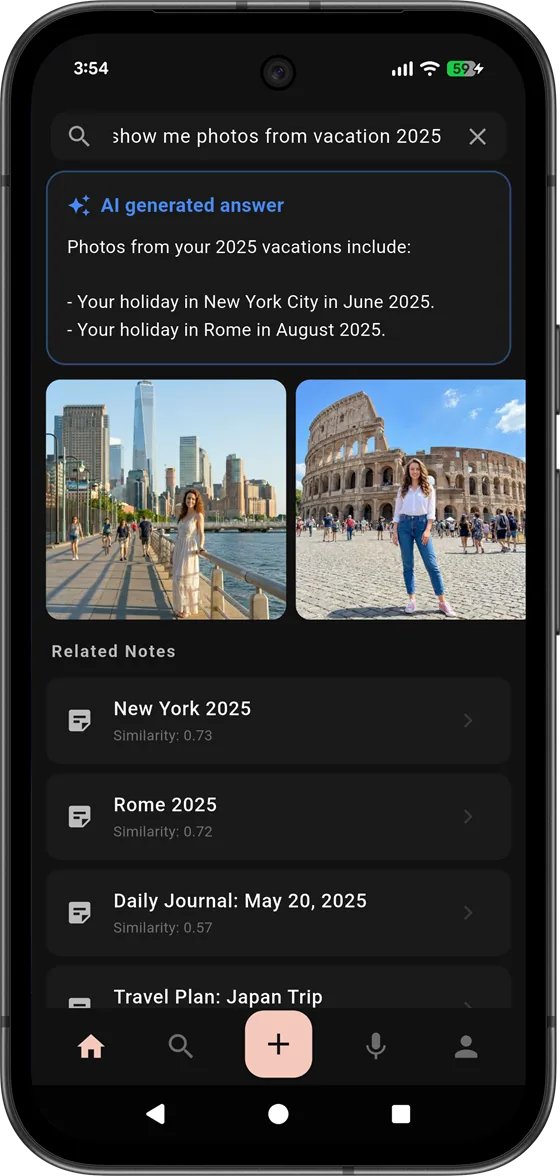
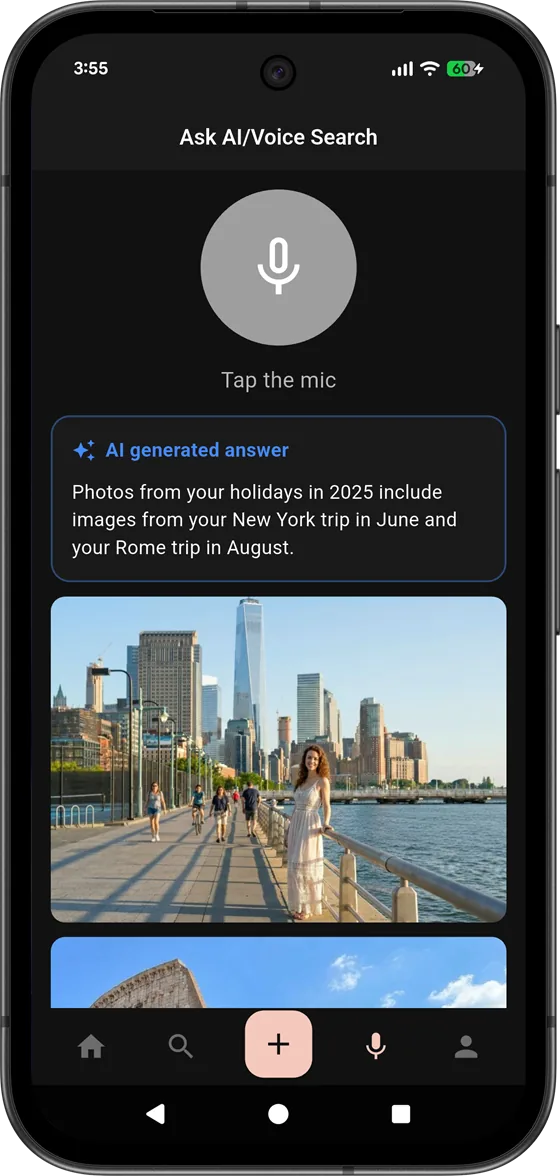
- A voice-first notes app whose AI assistant answers questions straight from the user's own notes, grounded in them and traceable to their sources.
- Outcome
- One product on iOS, Android and web, shipped to the App Store and Google Play, with speech in and out across 10 languages and a freemium subscription running across multiple regions.
What this case study covers
- The product we set out to build
- Ask, do not search
- Removing the keyboard: speech in, speech out
- How we approached the build
- Answering from the user's notes, not from thin air
- Making the assistant trustworthy
- Finding by meaning, not by keyword
- Treating private notes as private
- Choosing a model you can afford to run
- One product on iOS, Android and the web
- The same state on every device
- Built to stay available
- Working in many languages
- Why a tool like this compounds
- A real subscription business
- Shipping to the App Store and Google Play
- What this build shows about how we work
- What we would tell another team
- Frequently asked questions
The product we set out to build
Everyone who takes notes is building a knowledge base, whether they think of it that way or not. Meeting notes, ideas, research, snippets, things worth remembering: over months and years they add up to a genuinely valuable store of what a person knows. And then, at the exact moment that knowledge is needed, it becomes almost useless, because finding the right note means scrolling, guessing at keywords, and digging through folders until the half-remembered thing finally turns up. The knowledge is there. Getting it back out is the problem.
That is the frustration LostInNotes was built to remove. If someone already has a knowledge base, they should not have to spend time searching it - searching is work the software should do for them. Every minute a person spends hunting for a note they know they wrote is a minute wasted, and for anyone doing it on the job it is wasted time that costs money. The insight behind the product is almost embarrassingly simple: when people have their own store of knowledge, they should be able to ask it a question and get an answer, not go looking for the page that might contain one.
So the product we set out to build was not a prettier notebook. It was a notebook that answers. A person captures what they know as they always would, and when they need it back they ask a question in plain language and get a direct answer drawn from their own notes, along with where it came from. The note-taking is the easy half. The half that makes the product worth paying for is turning a pile of notes into something a person can simply talk to.
The knowledge is already there. The product exists to get it back out without making people go looking.
Ask, do not search
Search is the wrong default for a person's own knowledge, and it is worth being precise about why. Search hands the work back to the user. It returns a list of possible matches and expects them to open each one, read it, and decide which actually answers the question. That is fine when someone is exploring an unfamiliar library. It is absurd when the library is their own and they already know the answer is in there somewhere. Nobody wants ten notes that mention a topic; they want the one sentence that answers what they asked.
An AI assistant is a natural fit for exactly this. Given a question and access to a body of knowledge, it can read across everything relevant at once, pull together the parts that matter, and hand back an answer rather than a reading list. For a personal or professional knowledge base this is transformative, because the bottleneck was never storing information. It was retrieval. LostInNotes treats retrieval as the core feature and the note-taking as the thing that feeds it.
This reframing changes what the product is optimized for. A traditional notes app optimizes for capture and organization, and quietly assumes the user will do the finding. LostInNotes optimizes for the moment of need: a person has a question, and wants the answer from their own material with as little effort as possible. Everything else in the product exists to serve that moment. It is a small shift in framing that turns a place where knowledge goes to be stored into a place where knowledge is actually used.
Removing the keyboard: speech in, speech out
There was a second source of friction we wanted to remove, and it is one most notes apps ignore entirely: the keyboard. Typing is a bottleneck at both ends of the loop. Capturing a note by typing is slow, especially on a phone, and especially in the moments when good notes actually happen - walking out of a meeting, in the car, mid-thought, when stopping to type means the thought is gone. Typing a question is friction too, a small tax on the very thing the product is supposed to make effortless.
So LostInNotes is voice-first. Someone can speak a note to capture it, or ask a question out loud and hear the answer read back. Speech-to-text removes the cost of getting knowledge in; text-to-speech removes the cost of getting it back out. The point is not novelty. The point is that every bit of friction between having a thought and capturing it, or having a question and getting an answer, is friction that stops people from using the tool at all. Voice takes the biggest one off the table.
Building this well is more than bolting a microphone button onto a text field. Speech has to feel immediate, it has to work across many languages rather than just English, and the spoken answer has to be something a person actually wants to listen to rather than a robotic wall of text. Getting voice to feel like a natural way for someone to talk to their own knowledge, rather than a gimmick, took real attention to the details of timing, feedback and how a spoken answer is shaped differently from a written one.
How we approached the build
Breadth is the trap in a product this wide - mobile apps, a web app, a backend, an AI assistant, voice, payments - and the temptation is to build a little of everything at once and end up with a lot of half-finished pieces. We did the opposite. We went after the parts that carried the most risk and would decide whether the product was worth building at all.
The riskiest question was not whether we could build a notes app. It was whether an assistant answering from a person's own notes could be good enough to trust - accurate, grounded, and honest about what it did not know. If that did not work, the whole premise fell apart, so that is where we started. Alongside it we tackled the voice interaction early, because voice-first is a promise that shapes the entire interface, not a feature to sprinkle on later.
Only once those were proven did we build outward: the capture experience, the cross-platform apps, sync, the subscription model, and the long tail of work that turns a working idea into a shippable product. Answering the make-or-break questions first is a deliberate habit, and it is a big part of why the products we take on reach real users instead of stalling as an impressive demo that never quite becomes a product.
Answering from the user's notes, not from thin air
The defining decision in LostInNotes is that the assistant answers from the user's notes, not from a general model's memory of the internet. This is the difference between a tool people can rely on and a party trick, and it is worth being clear about what it means.
A generic chatbot answers from everything it was trained on, which makes it fluent and also makes it unreliable for a person's specific knowledge: it does not know what is in their notes, and when it does not know something it tends to make a plausible answer up. That is exactly the wrong behavior for a knowledge tool. LostInNotes instead retrieves the relevant parts of the person's own notes for each question and builds the answer from what it actually found. When someone asks something, the assistant is not reaching into a vague pool of general knowledge. It is reading their material and answering from it.
Every question is handled the same way. It reaches the semantic retrieval layer first: the query is turned into a vector representation and compared against the vectors held for each note in the database, returning those with the highest similarity. The result set is bounded by design to material belonging to the person asking, optionally narrowed to a single notebook - and only that set is handed to the language model as what it is allowed to build an answer from. Generation is deterministic, and the model returns a structured response conforming to a defined schema rather than free text; the answer, its source label and any attachments therefore arrive as separate fields instead of something the application has to dig out of prose.
Both of these were settled by measurement, not by assumption. The first was where to sit on the trade-off between retrieval quality and response time: we benchmarked several sizes of vector representation and chose the one with the best balance - accuracy held, while index size and query latency dropped sharply - which matters because every question starts with a vector search. The second was making the embedding model replaceable: a newer model can be indexed alongside the one in use and swapped in without rebuilding the store, which we have already done once.
A generic chatbot answers from the internet. LostInNotes answers from the user's own notes - and shows where each answer came from.
Making the assistant trustworthy
An assistant that answers from a person's knowledge is only useful if they can trust its answers, and trust is not a feature that can be added at the end. It has to be designed into how the assistant behaves.
The mechanism we settled on is provenance rather than refusal. Every answer ends with an explicit source label - drawn from your notes, or from the model's general knowledge - translated into whatever language the question was asked in. The assistant is instructed to exhaust the retrieved notes first and reach for general knowledge only when they genuinely do not contain the answer, but when it does reach, it says so. We preferred this to a flat "I could not find that": a labelled general-knowledge answer is more useful than a refusal and considerably more honest than an unlabelled one, and it leaves the user in a position to judge rather than guess.
Two properties keep that behaviour in place. The first is repeatability: the same question over the same material returns the same answer, not a differently-worded one each time - which is what makes the model's behaviour testable at all, since nothing can be regression-tested if it answers differently on every run. The second is a guaranteed response shape: the model returns data in a form the application can rely on, rather than prose it has to interpret. An assistant that occasionally returns something the application cannot parse is an assistant that occasionally shows the user an error instead of an answer.
The instruction layer steering the model is designed on the assumption that people will probe it, because some will. The assistant is meant to stay the product even when the questions turn to how it works. Combined with the bounded retrieval scope, that is what separates an assistant which holds its shape under pressure from one that can be talked into anything.
Finding by meaning, not by keyword
Underneath the assistant sits a change in how finding works at all. Traditional search matches words: a person types a term and gets back the notes that contain that exact term. That fails constantly for someone's own knowledge, because people rarely remember the exact words they used. They remember the idea. A search for "that thing about pricing the enterprise tier" turns up nothing when the note actually says "annual contract discount thresholds", and keyword search shrugs.
LostInNotes finds by meaning instead. It understands that a question and the note that answers it can be about the same thing while sharing almost no words, and it surfaces the note based on what it is about rather than which terms it happens to contain. This semantic understanding is what makes both the search and the assistant work: the assistant can only answer from a person's notes if it can reliably find the relevant ones, and finding them by meaning rather than by literal wording is what makes that possible across a real, human, inconsistently-worded knowledge base.
Underneath, this is a vector search rather than a text search. Every note carries a numeric representation of what it is about, and a question is turned into the same kind of representation. Finding the right notes then becomes a question of similarity rather than of matching words - which is precisely why a question and a note that share no vocabulary can still land next to each other. Only a narrow set of the closest matches reaches the model: wide enough to answer from, narrow enough to keep the reply quick and to let anyone checking the cited sources actually read them.
For the person using it, that separates a tool which only helps when they recall their exact phrasing from one that helps whenever they recall roughly what they were thinking about. The second is how memory actually works, and matching the tool to how people actually recall things is a large part of why it feels natural rather than fussy.
Treating private notes as private
People put their most personal and most sensitive thinking into notes, and a product that reads across all of it to answer questions carries a real responsibility. Treating that responsibility seriously shaped the product from the start.
A person's notes are theirs. They exist to serve that person - to be searched, to feed the assistant, to answer their questions - and not to become someone else's asset. That principle drives a series of concrete choices about how information is handled, who can reach it and how carefully it is guarded, all in service of a simple promise: the value a knowledge base creates flows back to the person who built it, and to no one else.
Isolation is enforced in the one place it cannot be forgotten. The similarity query filters on the owner's ID inside the SQL statement itself, in the same query that performs the vector comparison - not in application code above it that a later refactor might route around. There is no path through the system that retrieves a vector without simultaneously constraining it to the person who owns it. The optional notebook filter narrows the search further, and is itself checked for ownership before it is applied, so handing the API someone else's notebook ID accomplishes nothing at all.
The retrieval boundary doubles as the privacy boundary for the model. The assistant only ever sees the notes that one question returned - never the surrounding notebook, never anything belonging to anyone else - and nothing is used for training. The practical consequence is that any single request is bounded to one person's own material, by the database rather than by convention. That is a far easier property to demonstrate to a client's security team than a promise that a large language model will behave itself.
Choosing a model you can afford to run
An AI feature has a unit cost, and on a freemium product a large share of that cost lands on people who are not paying anything. That constraint shaped the model choice as much as quality did. We matched the model to the job rather than reaching for the largest one available, because the hard part of answering from someone's notes is retrieval, not reasoning. Once the right notes are in front of the model, generation is closer to summarisation than to analysis - and a fast, tightly-scoped model answers that in a fraction of the time a heavyweight one takes. Sizing the model to the actual task is what keeps an AI feature responsive and its unit economics sound at the same time.
Voice input goes through a second, cheaper decision before it reaches any of that. A small classification call first decides whether the person is asking a question or dictating a new note, and returns a structured action rather than prose. A dictated note goes straight to storage, skipping the embedding call, the vector search and the main model entirely. The cheapest request in any AI product is the one that never reaches the expensive path, and knowing which requests those are is worth more than any prompt optimisation.
Retrieval width is a cost lever in the same way. A narrow set of the closest matches rather than a broad one keeps the prompt short, and prompt length is most of what an inference call actually costs. What makes this manageable rather than fragile is that all three levers - which model generates, how many notes are retrieved, which embedding version is queried - are configuration rather than architecture. The economics can be retuned per request without touching the product, which is exactly the flexibility you want on the day a provider changes its pricing.
One product on iOS, Android and the web
LostInNotes is not an iPhone app with a website bolted on. It is one product that lives on iOS, Android and the web, and is meant to feel like the same product wherever someone opens it. A note spoken on a phone is there on the laptop; a question asked on the web gets the same answer it would on mobile. That consistency is a promise to the user, and keeping it is an engineering decision made early rather than a coincidence.
Building three platforms as three separate apps would have tripled the work and guaranteed they drifted apart, with features landing on one before another and behavior subtly differing between them. Instead we built the experience from a shared foundation, so the same product logic drives every platform and the cost of supporting one more stays low. That is what makes it realistic for a small team to keep a genuinely cross-platform product coherent, and it is the same approach that lets us deliver mobile and web together for clients without the budget of three separate builds.
Each platform still gets to feel native where it counts. A phone and a browser are different environments with different expectations, and respecting those differences while sharing everything underneath is the balance that makes a cross-platform product feel like a first-class citizen everywhere rather than a lowest common denominator.
The same state on every device
The promise that a person's notes are the same everywhere sounds simple, and behind it sits a decision taken at the very start: the service is the source of truth, not the device. Every client works against the same state rather than keeping its own copy and trying to reconcile it later.
That is a deliberate choice, and it removes an entire class of problems - diverging versions of the same note, duplicates after a reconnect, one edit silently overwriting another. For a product where losing a single note undermines the whole point of it, we judged that price lower than the cost of maintaining a merge mechanism that would, in some cases, have to ask the user to decide anyway.
This is exactly the kind of unglamorous, invisible-when-it-works engineering that separates a product people trust from a demo that looks great and quietly loses their data in the second week. It never shows up in a feature list, and it is one of the things that most determines whether people keep using a tool.
Built to stay available
A tool people rely on to hold their knowledge has to be there when they reach for it, which makes availability a feature in its own right. If the assistant is down at the moment someone needs an answer, the product has failed at the one job that matters, regardless of how good the answer would have been.
To support that, the backend runs across multiple regions rather than depending on a single place. Spreading the service out this way improves resilience, so a problem in one location does not take the whole product down, and it keeps the experience responsive for people in different parts of the world rather than fast for some and sluggish for the rest. Designing a system that runs in this arrangement and behaves correctly when one region stops responding is materially harder than standing up a single server. It is the kind of foundation nobody sees until the day of the first outage - and only then does it repay what it cost.
Users never see any of this, which is exactly the intention. Build reliability properly and nobody ever spends a thought on it: the app is there, it is quick, and it answers. That unremarkable experience is what lets a tool quietly turn into a daily habit.
Working in many languages
LostInNotes works in many languages, and for a product built around understanding meaning, that is a good deal more than translating the buttons. People take notes in their own language, ask questions in it, and expect voice to understand them and answer back in it. Every part of the product that deals in meaning has to work across all of those languages, not just the interface labels.
That reaches deep into the product. Finding a note by meaning has to work when the question and the note are in the same language, and the assistant has to answer in the language the person is actually using. Voice raises the bar again: speech recognition and spoken answers have to hold up across a wide range of languages and accents, not just deliver a polished experience in English and a poor one everywhere else. Supporting ten languages properly is a commitment that touches capture, search, the assistant and voice all at once.
The payoff is a product that treats people who do not work in English as first-class users rather than an afterthought, which for a company based in Europe and building for a European and global audience is not a nice-to-have. It is table stakes, and getting it right from the start is far cheaper than retrofitting it once the product assumes one language everywhere.
Why a tool like this compounds
Most software is worth about the same on day one hundred as on day one. A tool built around a person's own knowledge is different: it gets more valuable the more it is used. Every note someone adds is one more thing the assistant can answer from, so the product does not just hold its value over time, it grows it. The knowledge base a person builds this month makes next month's answers better, and the habit quietly feeds itself.
That compounding is the real reason the ask-do-not-search framing matters so much. If finding one's own notes is painful, people stop trusting the base, stop adding to it, and the flywheel never starts turning. If asking is effortless and the answers are reliable, they keep feeding it, and each addition raises the value of everything already there. The product's job is to keep that loop turning: make capture frictionless so knowledge goes in, make answers trustworthy so people keep coming back, and be there every single time so it becomes something they reach for without thinking.
This is also why the unglamorous work matters so much on a product like this. Reliability, sync, honest answers, voice that actually works - none of them is the headline feature, but each one protects the loop. A single lost note, one confidently wrong answer, or one outage at the wrong moment, and a person's trust in their own knowledge base takes a hit that a flashy feature cannot repair. Building for the long, compounding relationship rather than the impressive first demo is a large part of what separates a product people keep from one they try once. It is the same lens we bring to a client's product: the question is never just whether it demos well, but whether someone will still be relying on it a year from now.
A real subscription business
LostInNotes is not a demo or a side project; it is a subscription product that people pay for, and building the business model into the product is its own body of work. The model is freemium: a free tier generous enough for people to use the product and see its value, plus a paid tier for those who come to rely on it. The assistant, and how much of it someone uses, sits at the heart of what a subscription unlocks.
Making freemium work is more subtle than putting a wall around some features. The free tier has to be useful enough that people stick around and reach the moment where the product proves itself, while the paid tier has to be clearly worth it. Behind that sit real mechanics: tracking usage against limits fairly and reliably, handling the moment someone upgrades or their subscription lapses, and doing all of this consistently across mobile app stores and the web, which handle payments in completely different ways. A subscription that works perfectly on iOS but breaks on the web is not a working subscription.
We built the product around this from the start rather than bolting a paywall on at the end, because retrofitting a billing model into a product that never expected one is a well-known way to lose weeks. Getting the free-to-paid experience to feel fair and seamless, wherever someone happens to be using the product, is part of what turns a good tool into a business.
Shipping to the App Store and Google Play
A mobile product is not finished when it runs on one developer's phone. It is finished when it is live on the App Store and Google Play, and getting there is a stage with its own rules that catches teams out. Both stores review what they publish, and an app that combines subscriptions, an AI assistant, voice and access to a person's private notes gives a reviewer plenty to scrutinize.
Each store has its own expectations for how subscriptions are presented and billed, how permissions like the microphone are requested and explained, and how user data is handled and disclosed. Meeting all of that, on two stores with different rules, and getting through review without a string of rejections that each cost days, is precisely the kind of work that a first release most often underestimates. It is also work we have been through many times, which is why we take it on as part of the job rather than treating it as a surprise at the end.
The reward, as with everything at this stage, is invisible: an app that arrives from the store like any other download, clears review without a fight, and earns enough trust to be filled with someone's private knowledge. That trust is earned in a hundred small details that no user ever sees, and it is the difference between a product that ships and one that gets stuck a week short of the finish line.
What this build shows about how we work
Wiring a chatbot to a database is a weekend. The months come afterwards: answers accurate enough that someone stops double-checking them, retrieval that still works when the question and the note share no vocabulary, a unit cost that survives a free tier, three platforms that stay in sync, and billing that means the same thing on all of them.
The awkward part of building on a language model is that quality has no compiler. Nothing turns red when the assistant starts answering slightly worse, so the checks had to be deliberate: fixed questions over fixed notes, enforced repeatability so two runs are comparable at all, and someone reading the output who had not written the prompt. An AI product hides its worst behaviour inside answers that read perfectly well, which is precisely why its author is the wrong person to review them.
The notes app is the least transferable thing here. What transfers is a retrieval layer over private content, an answer that carries its own provenance, a model chosen on cost as much as on quality, and a migration path ready for the day a better embedding model appears. Point the same architecture at contracts, tickets or internal documentation and very little of it changes.
What we would tell another team
Building an AI product over private data, across mobile and web, with a real subscription behind it? Five things we tell every client before the first sprint.
- Ground the AI in your own data. An assistant that answers from a general model will make things up about your specific knowledge. Retrieving from your real content and answering from what you find is the difference between a tool people trust and one they quietly stop using.
- Design honesty in from the start. Teaching an assistant to say "I do not know" rather than inventing an answer is harder than it sounds and more important than almost any feature. A confident wrong answer is worse than no answer.
- Voice is friction removal, not a gimmick. If you build it seriously - fast, multilingual, with answers shaped for listening - it changes how much people actually use the product. If you bolt it on, it is a button nobody presses.
- Sync is a first-class problem. For anything holding a person's knowledge, losing or duplicating data is not a glitch, it is a broken promise. Treat it as core, not as plumbing.
- Build the business model in early. Freemium and cross-platform billing are real engineering. Retrofitting them into a product that never expected them costs weeks you did not budget for.
Each of these is something we would raise on a first call, because each one moves a budget. The gap between an AI demo and an AI product people pay for is made almost entirely of these five, and not one of them is visible while the demo is going well.
Frequently asked questions
Is LostInNotes your own product, or did you build it for a client?
It is our own. We came up with it, designed it, built it and shipped it ourselves to the App Store, Google Play and the web. We show it because it is proof of what we deliver, and we build for clients the same way.
Could you build an AI assistant that answers from our own data or knowledge base?
Yes. LostInNotes answers grounded in the user's own notes rather than from a generic model, and the same approach works over a company's documents, tickets or internal knowledge base. The value is that people ask a question instead of searching for the answer.
Can you add voice input and spoken answers to our app?
Yes. LostInNotes lets people speak their notes and questions and hear the answers read back, in many languages. Voice removes the friction of typing, and we can bring the same speech-to-text and text-to-speech interaction to other products.
Do you build one product across iOS, Android and the web?
Yes. LostInNotes is a single product on iOS, Android and the web, built from one shared codebase so the experience stays consistent and the cost of adding a platform stays low.
How do you stop an AI assistant from making things up?
We retrieve from the user's own content first and answer from what was actually found, then label every answer with where it came from - the user's notes or the model's general knowledge. Generation runs at deterministically and in an enforced response shape, so the behaviour is repeatable and therefore testable. For a knowledge tool, an answer whose provenance is visible is worth far more than one that merely sounds confident.
Do we own the code and the store accounts?
Yes. You own the code, the repositories and the store accounts. We can hand everything over to your in-house team whenever you need it, with no lock-in.
Have a product that needs building?
We take mobile and web products from an empty repository to shipped - AI, voice, payments and app store review included. A 30-minute call is enough to tell you what yours realistically takes.
Book a call